
Drama
A drama is a rich dialog that usually has options and additional actions.
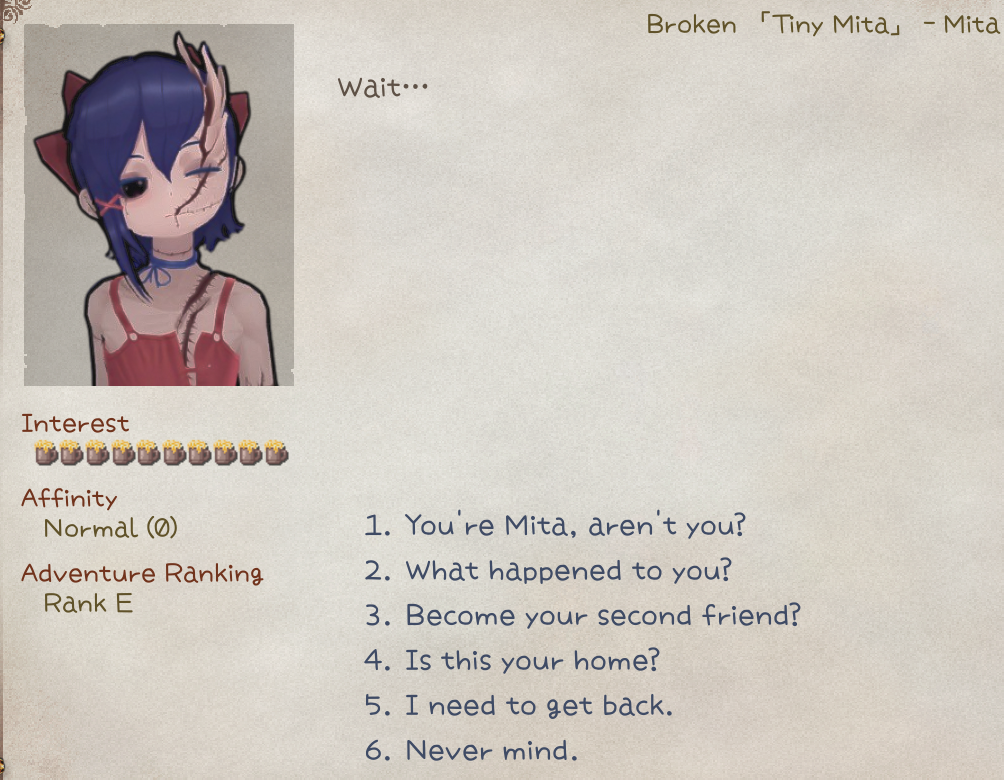
Routing
To give a character a default drama, place id.xlsx in LangMod/**/Dialog/Drama/, using the character's ID as the file name (e.g., tinymita.xlsx for tinymita). The game automatically loads the drama file whose name matches the character ID.
To use a differently named drama file, such as DramaFileId.xlsx, also add the tag addDrama(DramaFileId) to the character's source tag column.
You can also use the C# API chara.SetDramaOverride(DramaFileId) or chara.ShowDialog(DramaId, step).
Refer to the game sheets in Elin/Package/_Elona/Lang/_Dialog/Drama when making new drama sheets, or download the Tiny Mita example for a template.

Hot Reload
Drama sheets can be edited during gameplay. Changes apply automatically next time the dialog opens.
Definition
Line
A drama sheet is read top to bottom and consists of multiple lines. Each line has these fields (defined in the first row):
- step: Marks the start of a step; all following lines belong to this step until another
stepappears. - jump: The step to jump to after this line runs.
- if / if2: Conditions to check before execution. If
if2is present, both must be true. - action: The action to perform.
- param: Parameter for the action.
- actor: The speaker for the action or talk line.
?:???.tg: Target drama character. Default whenactoris blank.narrator: Default narrator.pc: Player.
- id: Unique ID, required for
textandchoicelines. Not needed for other lines. - text_XX / text_JP / text_EN / text: Dialogue content.
XXis a language code (e.g.,text_CN,text_ZHTW).textis the fallback if a non-builtin language is missing.text_JPandtext_ENare required, but you don't have to provide translations.
(Click to zoom) 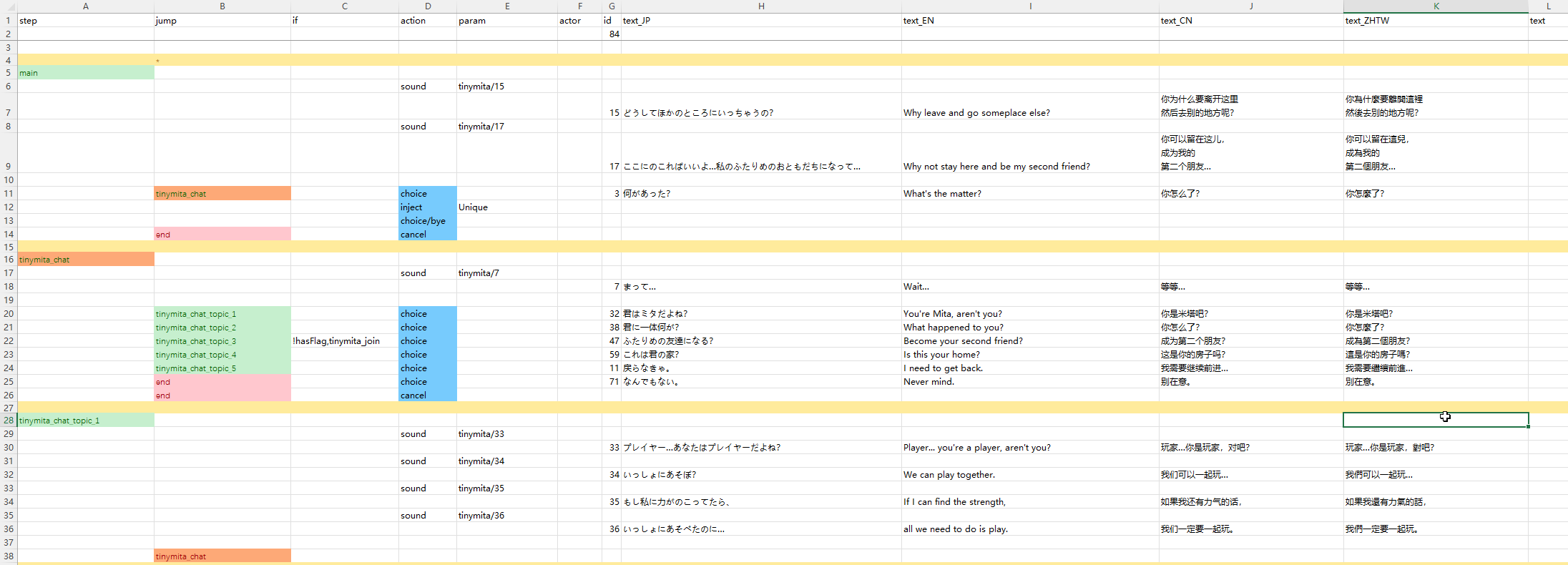
Step
Drama flow is organized into steps. Each step contains one or many lines, which can include dialogue, actions, and conditions.
main is the default starting step, and end exits the drama.
Avoid step names starting with _ or flag; they can conflict with internal steps.
Builtin Steps
Builtin Steps
The builtin drama steps below are always injected when the drama loads. To use one, set it as the jump target. The inject/Unique action also inserts the default talk options ("Let's Talk" etc.) that reference these steps, so you usually do not need to use them yourself.
| step name | usage |
|---|---|
_banish | End the drama |
_bye | End the drama |
_toggleSharedEquip | Toggle tg shared equipment usage |
_daMakeMaid | Set tg as maid |
_joinParty | If tg trait is joinable, set as party member. Not the same as inviting |
_leaveParty | Remove tg from party and send to home zone |
_makeLivestock | Set tg as faction livestock |
_makeResident | Set tg as faction resident |
_depart | Remove tg from faction |
_rumor | Rumor |
_sleepBeside | Toggle tg sleep beside player state |
_disableLoyal | Toggle tg loyal state |
_suck | tg sucks pc. Blood sucking takes priority over cat huffing |
_insult | Toggle tg taunt state |
_makeHome | Set current zone branch as tg home branch |
_invite | Try to invite tg as an ally; checks player attributes and whether tg can be invited. To unconditionally invite as ally, use expanded action join_party() |
_Guide | Guide player to a list of locations |
_tail | Have sex, for money |
_whore | Have sex, cost money |
_bloom | Deepen bond with tg |
_buy | Buy stuff from tg |
_buyPlan | Buy research plan from tg |
_give | Give stuff to tg |
_blessing | Blessing upon party |
_train | Train skills with tg |
_changeDomain | Change tg domain |
_revive | Revive dead allies |
_buySlave | Buy slave from tg |
_trade | Trade items with tg |
_identify | Identify items with tg |
_identifyAll | Identify all items with tg |
_identifySP | Identify items with tg using superior skill |
_bout | Challenge to a duel |
_news | Spawn a random dungeon on map |
_heal | Heal the player |
_food | Buy some food from tg |
_deposit | Deposit with tg |
_withdraw | Withdraw with tg |
_copyItem | Duplicate item with tg |
_extraTax | Pay additional tax |
_upgradeHearth | Upgrade hearth stone |
_sellFame | Sell fame |
_investZone | Invest current zone |
_investShop | Invest tg barter shop |
_changeTitle | Change player title |
_buyLand | Expand current zone map |
_disableMove | Set tg to not move |
_enableMove | Set tg can move |
Actions
Text lines are the most common. They only have id and text columns, plus an optional if condition. When executed, text lines require player input (click or key press) to advance.
Action lines (except choice) execute automatically without input. If both action and text are present, text is generally ignored.
For example, an action line placed after a text line won't execute until the text line is clicked to advance.
Builtin Actions
Builtin Actions
| action | param | description |
|---|---|---|
inject | Unique | Insert "Let's Talk" and a lot of useful steps |
choice | Add a choice to the last text line. Requires text and jump | |
choice/bye | Insert a default bye choice | |
cancel | Set right click / escape key behavior. Requires jump, usually set to end | |
setFlag | flag name,value(optional) | Set a flag with value or default 1 if not provided |
reload | Reload the drama so any flag changes made in the current drama can be applied. jump is optional and usually set to main; when omitted, execution continues in place. Don't confuse this with hot reload during development: for that you only need to save the changes, and the drama is reloaded the next time you start it | |
enableTone | Enable dialog tone for the entire drama | |
addActor | Add a drama actor to use later; text can set a name override. This happens automatically when you put a new id in the actor cell. Requires character id in actor | |
invoke | method name | Call a method. All available methods are hardcoded for specific uses. |
setBG | image name(optional) | Set an image as the background, or leave empty to clear it. Images can come from the Texture folder |
BGM | BGM id | Switch the BGM to specific one by id. Check the Sound & BGM page for custom BGM |
stopBGM | Stop the BGM and do not continue | |
lastBGM | Stop the BGM and continue the last one played | |
sound | sound id | Play a sound by id. Check the Sound & BGM page for custom sounds |
wait | duration | Pause execution at this line for the given number of seconds; useful for letting an animation finish |
alphaIn alphaOut | duration | Alpha (transparency) transition in seconds |
alphaInOut | duration,wait time | alphaIn first, wait in seconds, then alphaOut |
fadeIn fadeOut | duration,white/black(optional) | Fade transition in seconds |
fadeInOut | duration,wait time,white/black(optional) | fadeIn first, wait in seconds, then fadeOut |
hideUI | transition | Hide the HUD elements with a transition in seconds. Restored when exiting drama |
hideDialog | Hide the drama dialog for cutscenes. Text lines force the dialog to show again, so combine this with wait | |
end | Explicitly end the drama. Same as jump to drama step end | |
addKeyItem | keyitem id | Add keyitem with id to the player |
drop | item id | Drop an item as reward at player's position |
addResource | resource name,count | Add home resource by count |
shake | Shake the screen | |
slap | The drama owner character slaps the player (executes after the dialog closes, player takes minor damage) | |
destroyItem | item id | Find and destroy the item with id from player's inventory |
focus | Immediately move and focus camera to the drama owner character | |
focusChara | character id,speed(optional) | Move and focus camera to the character with id on the same map |
focusPC | speed(optional) | Move and focus camera to the player |
unfocus | Reset and unfocus camera | |
destroy | character id | Destroy a character with id on the same map |
save | Save game | |
setHour | hour | Set the game time in hours |
Separate multiple parameters with commas (,) and no spaces in between.
Text
Text in the text_JP, text_EN and text_XX columns becomes a talk event; the player must click or press a key to continue. You cannot combine action lines with text lines unless the action says otherwise.
Random Topic
$topic picks a random line from a defined topic in chara_talk.xlsx, either from the Elin default file at Package/_Elona/Lang/EN/Data/chara_talk.xlsx or from LangMod/**/Data/chara_talk.xlsx. For example, $sup plays one of the following lines at random:
What?
Huh?
...?
Did you need something?
What do you want?
What's up?
Is something wrong?
What is it?Substitutions
| text | value |
|---|---|
#tg_his | tg's possessive pronoun |
#tg_him | tg's object pronoun |
#tg | tg character name |
#last_choice | text of the last choice |
#newline | newline character |
#costHire | cost to hire tg (number, localized) |
#self / #me | full name of character tg (including title) |
#his | tg's possessive pronoun |
#him | tg's object pronoun |
#1 ~ #5 | external variables refDrama1 ~ refDrama5 (number auto-formatted) |
#god | name of the god (if tg is not empty, uses its faith; otherwise random religion) |
#player / #title | player's title |
#zone | current zone name |
#guild_title | title of the guild associated with the current plot |
#guild | name of the guild in the current plot |
#race | player's race name |
#pc | player's short name |
#pc_full | player's full name (including title) |
#pc_his | player's possessive pronoun |
#pc_him | player's object pronoun |
#pc_race | player's race |
#aka | player's alias |
#bigdaddy | localized string "bigdaddy" |
#festival | festival name (if the zone has a festival, use its name; otherwise generic) |
#brother2 | "brother" or "sister" (based on player gender) |
#brother | random term for brother/sister (randomly from bro or sis list) |
#onii2 | random term for older brother/sister (from onii2/onee2 lists) |
#onii | random term for older brother/sister (from onii/onee lists) |
#gender | term for player gender (indexed into gendersDrama list by gender) |
#he | "he" or "she" (based on player gender) |
#He | same as above, but with initial capital letter |
These substitutions can also be used in dialog.xlsx.
Dynamic Content
A text cell that starts with #eval <C# script here..> is evaluated dynamically; the script must return a string.
Conditions
Conditions decide whether a line runs.
Static Conditions
Static conditions are evaluated once on load.
Attach conditions to any line using the if (and optionally if2) column.
| Condition | Param | Description |
|---|---|---|
hasFlag | flag name | Player has flag and value ≠ 0 |
!hasFlag | flag name | Player doesn't have flag or value = 0 |
hasMelilithCurse | — | Player has Melilith curse |
merchant | — | Player is at Merchant Guild |
fighter | — | Player is at Fighter Guild |
thief | — | Player is at Thief Guild |
mage | — | Player is at Mage Guild |
hasItem | item id | Player has the item in inventory |
isCompleted | quest id | Player has completed the quest |
Simple value checks (most common for flags/counters):
=,example_flag,1
>,example_counter,20
!,example_flag,69Most lines only need the if column. Add an if2 column if you need multiple conditions.
Dynamic Conditions
To enable/disable a line dynamically, use:
invoke*condition expression, orevalaction that returns abool

Branching
Set jump to a drama step to branch into that step.
Set jump to eval_result and use an eval action that returns a string to dynamically choose the jump target.

Invoke* Expression
The special action invoke* (or i* for short) calls expansion methods: 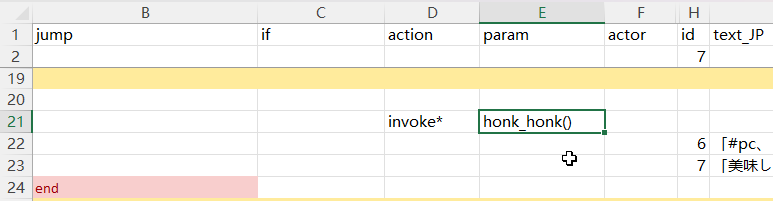
Syntax
Set action to invoke* or i*, and param to one of the valid methods:
| action | param | actor |
|---|---|---|
invoke*/i* | honk_honk(arg1, arg2) | pc |
This invokes a method called honk_honk with 2 parameters, arg1 and arg2.
Shorthand prefixes are available for condition composition: !expr = not(expr), &expr = and(expr), ?expr = or(expr).
Parameter
Parameters go inside the method's parentheses, separated by , , as in code. With no parameters, use empty () parentheses.
Most methods use the actor cell as the target character, such as pc, tg (the drama target character), or any valid character id. Default is tg.
If the line's jump has a value, the method's return value decides whether the jump happens: true jumps, anything else does not.
Value Expression Syntax
DramaValueExpression is used to evaluate or assign values.
Examples:
| Expression | Meaning |
|---|---|
69 | Assign value 69 |
=69 | Assign value 69 |
+5 | Increase original value by 5 |
-3 | Decrease original value by 3 |
*10 | Multiply original value by 10 |
/2 | Divide original value by 2 |
==69 | Check if equal to 69 |
!=114 | Check if not equal to 114 |
>10 | Check if greater than 10 |
>=20 | Check if greater than or equal to 20 |
<5 | Check if less than 5 |
<=3 | Check if less than or equal to 3 |
++ | Increase original value by 1 |
-- | Decrease original value by 1 |
x10 | Multiply original value by 10 (alias of *) |
Expanded Actions
| method | param | description | jump |
|---|---|---|---|
add_item | item id, material alias(optional), level(optional), count(optional) | Add the item with id to actor. Defaults to the item's default material, auto level, and a count of 1 | always |
equip_item | item id | Create and equip the item with id on actor | always |
destroy_item | item id, count(optional) | Destroy items with id on actor, default -1 which destroys all matching items | always |
join_faith | religion id(optional) | Make actor join the religion with id, or leave the current religion if the id is empty | always |
join_party | Make actor join player party unconditionally | always | |
apply_condition | condition alias, power | Apply a condition with id to actor, default power 100 | always |
remove_condition | condition alias | Remove the condition on actor | always |
Expanded Scene Play
| method | param | description | jump |
|---|---|---|---|
move_next_to | character id | Move actor next to the character with id on the same map | If target found |
move_tile | x offset, y offset | Move actor with the relative tile offset, such as 1, 1 or 2, -1 | always |
move_to | x, y | Move actor to the absolute tile position on the map, such as 64, 44 or 12, 0 | always |
move_zone | zone id, level(optional) | Move actor to a specific zone with id, and specific level, default level 0 | if success |
move_zone_2 | zone full name | Move actor to a specific zone using zone full name syntax, such as derphy@-1 | if success |
play_anime | anime id | Play animation on actor | always |
play_effect | effect id | Play effect on actor | always |
play_effect_at | effect id, x, y | Play effect at tile position on the map | always |
play_emote | emote id, duration(optional) | Play emote on actor, default duration 1 second | always |
play_screen_effect | screen effect id | Play screen effect | always |
pop_text | text | Pop a text bubble above actor head | always |
set_portrait | portrait id(optional) | Set actor portrait used during dialog to a specific one or reset with empty id, from Portrait folder, e.g. UN_myChara_happy.png could be set with happy or UN_myChara_happy | If actor found |
set_portrait_override | portrait id(optional) | Set actor portrait used outside of dialog to a specific one or reset with empty id, from Portrait folder. Must be full id. This does not affect the current dialog portrait (set by set_portrait) | always |
set_sprite | texture id(optional) | Set the custom sprite override for actor or reset with empty id, from Texture folder | always |
show_book | category/book id | Open a book, supports LangMod/**/Text folder, for example, use Book/ok for Text/Book/ok.txt | If success |
Expanded Modifications
| method | param | description | jump |
|---|---|---|---|
mod_affinity | value expression | Modify actor affinity with value expression | always |
mod_currency | currency type, value expression | Modify actor currency with value expression. money money2 plat medal influence casino_coin ecopo | always |
mod_element | element alias, value(optional), potential(optional) | Modifies a specified element (feat/resistance/skill, etc.) for the actor, default value 1 and potential 100. Different types of elements use different value scaling | always |
mod_element_exp | element alias, value expression | Modifies the exp of a specified element for the actor | always |
mod_fame | value expression | Modify player fame with value expression | always |
mod_flag | flag, value expression(optional) | Modify the flag value from actor with value expression, such as +1, =1, 0, default =1. Works on non-player characters too. These per-character flags are stored separately from the setFlag/hasFlag dialog flags | always |
mod_keyitem | keyitem alias, value expression(optional) | Modify player's keyitem value with expression, default =1 | If success |
Expanded Conditions
These are also expansion methods called with the invoke* action, but here the return value is what matters.
| method | param | description | jump |
|---|---|---|---|
if_affinity | value expression | Check actor affinity with expression, such as <5, >=90, !=0 | If satisfies |
if_condition | condition alias, value expression(optional) | Check if actor has active condition with alias, optionally checking its power with expression, default >=1 | If active |
if_currency | currency type, value expression | Check actor currency with value expression. money money2 plat medal influence casino_coin ecopo | If satisfies |
if_element | element alias, value expression | Check actor element with expression | If satisfies |
if_faith | religion id, reward rank(optional) | Check if actor is certain religion and meets reward rank, default >=0 | If satisfies |
if_fame | value expression | Check player's fame with value expression | If satisfies |
if_flag | flag name, value expression(optional) | Check actor flag value with expression, such as =5, 1, !=0, default >=1. Reads the same per-character flags as mod_flag, not the setFlag/hasFlag dialog flags | If satisfies |
if_lv | value expression | Check actor level with value expression | If satisfies |
if_has_item | item id, value expression(optional) | Checks if actor possesses a quantity of the item that meets the expression, default >=1 | If satisfies |
if_hostility | hostility value expression | Checks if actor meets a specific hostility, such as =Ally or >Enemy. Values in ascending order: Enemy, Neutral, Friend, Ally | If satisfies |
if_in_party | true or false(optional) | Check if actor is in player's party, default true | If satisfies |
if_keyitem | keyitem alias, value expression(optional) | Check if player has keyitem with expression, default >0 | If satisfies |
if_race | race id | Check if actor is of certain race | If satisfies |
if_tag | tag | Check if actor has certain tag defined in Chara row | If defined |
if_zone | zone id, level(optional) | Check if actor is in certain zone and optionally check level | If present |
if_zone_2 | zone full name | Check if actor is in certain zone with zone full name syntax, such as derphy@-1 | If present |
Special Methods
| method | param | description | jump |
|---|---|---|---|
console_cmd | cmd param1 param2... | Run console command | always |
eval | C# script or file with <<<path.cs syntax | Execute the C# script. Prefer the eval action over invoke* with eval()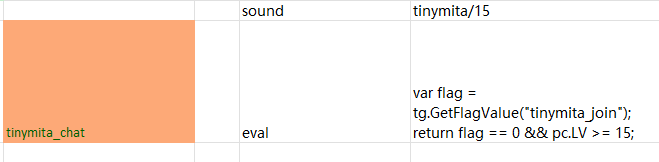 | If returns true |
and | and(if_flag(flag1, >0), if_flag(flag2, <0)...) | Takes invoke* expressions as parameters and evaluates all of them | If all satisfy |
or | or(if_race(lich), if_race(snail)...) | Takes invoke* expressions as parameters and evaluates all of them | If any satisfies |
not | not(if_zone(dungeon), if_zone(field), if_zone(underground)...) | Takes invoke* expressions as parameters and evaluates all of them | If none satisfies |
API
Elin has an API for adding custom expansion methods from your own script DLL.
Action Parser
During drama loading, parsers are called for registered non-builtin action lines and create the events for them.
[ElinDramaActionParser("my_action")]
public static bool ExampleParser(DramaManager dm, Dictionary<string, string> line)
{
    dm.AddEvent(new DramaEventTalk(line["actor"], () => {
        // processing
        return "A text line!";
    }));
    // this line is handled
    return true;
}
// or register manually
CustomDramaExpansion.AddDramaActionParser("my_action", ExampleParser);Action Invoke
Invokes are automatically compiled into invoke* expressions and are called when the line is executed during drama play.
[ElinDramaActionInvoke]
public static bool add_item(DramaManager dm, Dictionary<string, string> line,
                            string itemId,
                            string materialAlias = "wood",
                            int lv = -1,
                            int count = 1)
{
    var chara = dm.GetChara(line["actor"]);

    var mat = sources.materials.alias.TryGetValue(materialAlias, "wood");
    var item = ThingGen.Create(itemId, mat.id, lv).SetNum(count);
    chara.Pick(item);

    return true;
}

[ElinDramaActionInvoke("nodiscard")]
public static bool if_element(DramaManager dm, Dictionary<string, string> line,
                              string elementAlias,
                              DramaValueExpression expr)
{
    var chara = dm.GetChara(line["actor"]);
    return chara.HasElement(elementAlias) && expr.Compare(chara.Evalue(elementAlias));
}[ElinDramaActionInvoke]
public static bool console_cmd(DramaManager dm, Dictionary<string, string> line,
params string[] parameters)
{
string.Join(' ', parameters).EvaluateAsCommand();
return true;
}Drama invoke methods must be static and return bool, and their parameters must start with DramaManager dm, Dictionary<string, string> line.
Elin can auto-convert the expression parameters, or pass them as string[]. Auto-convertible types are the builtin data types, DramaValueExpression, and custom types with a static bool TryParse(string, out T) method.
See the CustomDramaExpansion implementation for examples.
Text Styles
You can use the following tags to add styles like bold/italic/color to the text.
| Tag | Description | Example Usage |
|---|---|---|
<b> </b> | Bold | <b>Bold Text</b> |
<i> </i> | Italic | <i>Italic Text</i> |
<size=...> </size> | Font size (pixels) | <size=22>Large</size> |
<color=...> </color> | Text color (color name/#hex) | <color=red>Red</color> <color=#add8e6ff>Light Blue</color> |
In drama sheet text, a line break entered with Alt + Enter shows as a new line on the same page. dialog.xlsx behaves differently.
You can also use #newline to break lines.
For full details, see the Unity Rich Text documentation.
Scripting
You can run C# code directly in a drama sheet using the eval action.
It offers the same scripting capabilities as regular C#, with these differences:
- Script state is tied to the current drama instance (persists until the drama ends, then auto-resets).
- Shortcuts:
dm= DramaManager,line= current lineDictionary<string, string>,tg= targetChara,pc= playerChara.
Return value behavior:
bool+ validjumptarget → determines whether to jump.string+jumpcell set toeval_result→ uses the string as the new jump target.- No return value → treated as a simple action.
Import a script file from the same folder with: <<<script_snippet.cs
Passing Variables
Use the shared Script dictionary:
// First eval
var value = EClass.rnd(100) * 5;
Script["random_value"] = value;

// Later eval
var value = (int)Script["random_value"];Common Examples
| Function | Code |
|---|---|
| Jump to step | dm.Goto("my_new_step"); |
| Add "Let's chat!" option | dm.InjectUniqueRumor(); |
| Add temporary talk | dm.AddTempTalk("text", "actor", "jump"); |
| Get Chara instance | var chara = dm.GetChara("tg"); |
| Recruit to party | chara.MakeAlly(); |
| Modify level | chara.SetLv(chara.LV + 5); |
Need help? Ask on Elona Discord: @freshcloth or reach via email.