
PCC
The player's sprite is a PCC. Clothing, pants, eyes, and other accessories are all PCC parts. Mounts are also stored in the PCC folder.
You can create not only clothes, but also mermaid tails, fox tails, or even turn the protagonist into a slime.
PCC Canvas
A PCC is a sprite sheet made of 32×48 tiles. Each row represents a direction, and each column represents a frame.
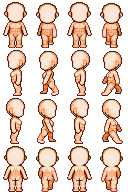
Layers & Path
PCC parts use the following layer order:
- hairbk
- mantle
- body
- undie
- boots
- pants
- cloth
- chest
- belt
- glove
- eye
- hair
- subhair
- face
- head
- etc
- mantlebk
hairbk and mantlebk are the back views of their respective layers.
Naming
PCC parts must follow this format: pcc_layer_uniqueId.png
Examples:
pcc_face_mypccmod01pcc_cloth_customwardrobe3
The uniqueId must:
- be unique to avoid conflicts
- not contain underscores (
_)
File Location
Place PCC files in Actor/PCC/female folder inside your mod package. Note that this path always contains female, regardless of whether the character is male or female.
Mount PCC files should be placed in the Actor/PCC/ride folder inside your mod package.
Oversized Canvas
To create tiles other than 32×48, install the Variable Sprite Support mod.